Styleshift - Effortlessly Style Your Outfits in No Time
A product design for easy personal outfit coordination through gesture interactions and image editing
 FigmaPersonal Project
Overview
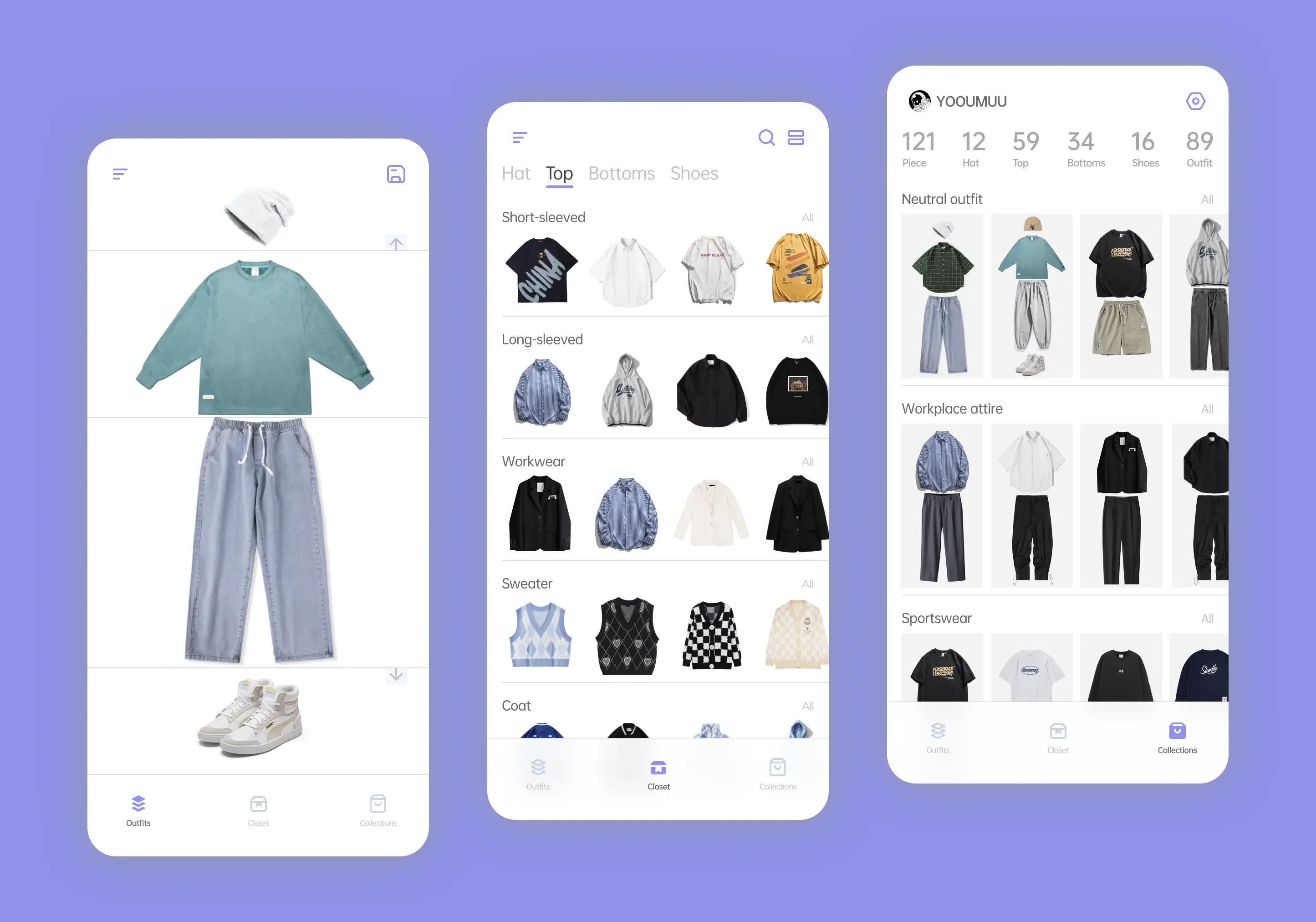
StyleShift is a product design that enables easy personal outfit coordination, storage management through simple gesture interactions and image editing.
Introduction
StyleShift is a product designed for easy personal outfit coordination and organization through simple gesture interactions and image editing.
Whether you have too many clothes to manage, struggle with outfit choices, or simply want to explore different combinations with your existing wardrobe, StyleShift is here to help. You can use it to quickly decide what to wear for the day. Additionally, you have the option to save and categorize outfit choices, making it convenient to access and select appropriate outfits for different seasons and occasions, saving you from the hassle of repetitive decision-making.
Starting the Project
The inspiration came from character outfit changes in games. I was thinking about a visual way to manage my existing wardrobe, especially if I have a lot of clothes. It would be great to have a tool where I can simply swipe through my clothes on my phone to see how I can dress up for the day. Additionally, I could save some outfit combinations for those moments when I don't feel like thinking too much about what to wear.
Brainstorm
After getting an initial impression of the project, I began brainstorming using sticky notes. Subsequently, I organized and categorized the ideas, leading me to identify four main aspects:
User Segmentation
People who have a lot of clothes, intend to manage their wardrobe, and have outfit coordination needs.
User Persona
Empathy Map
Storyboard
User Needs and Pain Points
Simplify Outfit Coordination: Users want a tool that simplifies the process of coordinating outfits, especially when they have a large wardrobe. They seek a convenient and efficient way to mix and match clothes effortlessly.
Time-Saving: Users desire a solution that helps them save time when deciding what to wear. They aim to reduce the time spent on repetitive outfit selection, especially during busy mornings or rushed moments.
Exploration of Outfit Combinations: Users are interested in exploring different outfit combinations with their existing clothes. They seek inspiration to create new looks and enhance their personal style.
Wardrobe Organization: Users want to efficiently manage their wardrobe by categorizing and organizing outfit choices for various occasions and seasons. They aim to maintain a well-structured wardrobe that caters to different needs.
Visual and Intuitive Interface: Users prefer a visually appealing and intuitive interface that allows them to interact with the tool easily. They want gesture-based interactions and image editing features to make the experience enjoyable.
Convenience and Accessibility: Users seek a tool that they can easily access on their smartphones or other devices. They desire a user-friendly platform that is readily available whenever they need it.
Decision-Making Support: Users look for support in making outfit decisions, especially during moments when they lack inspiration or are unsure about what to wear. They want the tool to suggest suitable outfit combinations based on their preferences and the occasion.
Flexibility and Customization: Users appreciate the flexibility to tailor the tool to their personal preferences. They want the option to customize outfit categories, tags, and save outfit combinations that align with their unique style and needs.
Functional Architecture
User Workflow
Sketch
Wireframe
Color Palette
Logo Design
Prototype
Summary
In the initial stages of my concept, I imagined the clothes having the appearance of being worn by a model (or the user's own photo). However, as the design process progressed, I came to recognize the difficulties in aligning the model's body shape and movements with the imported clothes. Furthermore, incorporating custom backgrounds seemed to result in a cluttered product presentation. As a result, I ultimately chose a white background and made the decision to omit the model feature. The overall UI design feels clean and simple.